
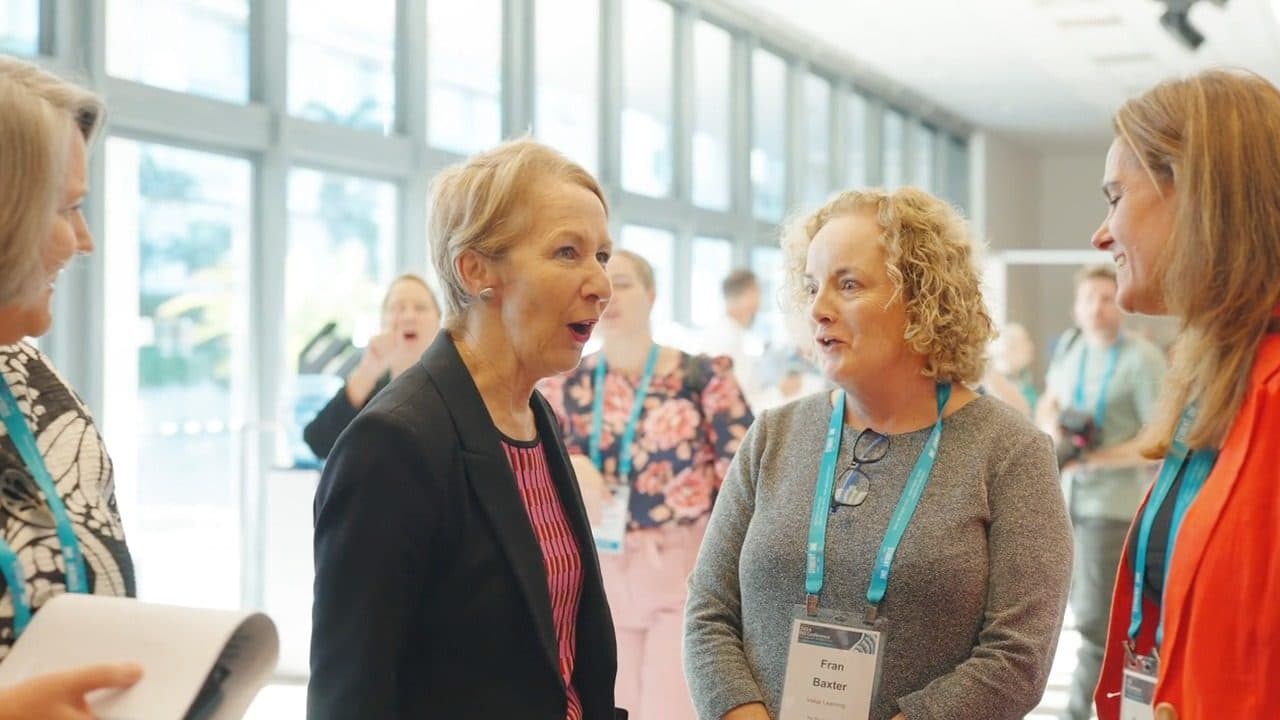
You make it on the day, not in the edit. You gotta get off the back wall and get among the people. Film faces, and the more the better: laughing, nodding, arguing over the last sausage roll. I know you don't want to. It's really important. Like, really.
Move around, change your angle, grab quick interviews (there's a guide on the site for that, it'll help with headroom and where to have them look), and get close enough to hear them. Then hand the lot to an editor. They can only do so much.
The footage from an iPhone is fine, but most conference videos are boring for one reason. Someone put a phone on a tripod at the back of the room, hit record and went to get a coffee. What comes back is forty minutes of the backs of heads and a tiny person on a stage. There's no edit in the world that turns that into something people want to watch.
The conference isn't the stage. It's the room. The bit people remember is the laugh after the CEO's joke, the queue at the coffee cart, two people from different departments finally putting faces to names. It's about emotion and having fun. If your conference is boring, you need to make it look like it's not.
A highlight video lives on reactions. If you didn't film the audience, there's nothing to cut to, and we can only watch the boss on stage for so long.
Get in their face and make them laugh
Walk up to people. Point the camera at them. Ask them something stupid first. “Best thing about today, apart from lunch?” They'll laugh, and that laugh is gold. Now ask the real question.
Nobody's natural on camera until they've laughed at something. Your job is to get them there. You'll feel embarrassed filming this. Don't worry, it can be fun. If you're going to use us, call me first on 0413 766 520 and I'll walk you through what I need to make it great.
I shoot this all the time. At the start of the day I run around to every table and say something like, “Let's get happy, people. More happy!” Then I film a bunch of it. It always makes the edit. Easy win.
A room full of people having a good time sells next year's conference better than any keynote. Don't be shy about it. You've got a lanyard. That's basically a press pass. Go hard!
What should you film at a conference?
This is the shot list. Tick it off through the day.
- The room, wide, once it's full. From up high if you can. Then again at the break when it's buzzing.
- Arrivals. Rego desk, name tags, handshakes, the hug from people who haven't seen each other since last year.
- Every speaker, close. Down the front or off to the side. Never from the back. I don't need 20 minutes. A few moments is fine for a recap. We'll use the interviews more than the keynote for these wrap videos.
- The audience reacting. Laughing, clapping, nodding, taking photos of the slides.
- The breaks. Coffee, networking, the stalls. The food too, just not people mid-mouthful.
- Quick interviews. Three or four people at least, one question each, twenty seconds. REALLY important. Get more than you want.
- The details. Signage, the logo on the stage, lanyards, the swag. These are your editor's transitions.
- The end. Applause, the pack-down, the last ones standing at the bar.
Different angles, every time
Move. Every few minutes, change where you're standing. Low from the floor looking up at the speaker. From the side of the stage looking out at the crowd. Over someone's shoulder. Through a gap in the audience. Wide shot, mid shot, tight shot.
Same moment, three angles, and the editor has something to cut between. One angle for forty minutes gives them nothing.
Hold every shot for five seconds. Count it out. Then move.
What about sound?
Your phone at the back of the room records the air conditioning. For the keynotes, ask the AV team to record the program audio off their desk. Most AV crews can do it if you ask before the day.
For interviews, get close. Arm's length, not across the room. There's a short guide on exactly this in the filming guides.
Phone or camera?
Phone's fine. It's half of what we get.
Shoot horizontal for the wrap video you'll play on the big screen. We can cut it square later. Please don't shoot a mix of vertical and horizontal. It'll do my head in and I'll block your next email ;)
Play day one on day two
This is the move. Film day one and upload before 5pm. Add the next-day rush, 25% on top of the base price, and we'll cut it that night. You'll have it by the morning tea break. Play it on day two.
The room sees itself on the big screen. The people you made laugh see themselves laughing. You look like a genius, and everyone's got something to share on LinkedIn before lunch.
How long should a conference highlight video be?
Sixty seconds. It doesn't need to be super long. Long enough to feel the day, short enough that people watch to the end. Lumberjack cuts conference videos at 60 seconds, 90 seconds or three minutes.
What does a conference video cost?
At Lumberjack, a conference video is $770 to $1,650 inc GST. The price depends on how much footage you send (under 20 minutes, under an hour or under two hours) and how long you want the finished video. Shot more than two hours? That's a Custom Cut, quoted before any work starts.
Want the keynote on its own with the slides synced in? That's the Presentation service, from $660. Rather have a fast-cut hype reel than a wrap? Highlight Reel, from $660.
Every one comes with a first cut in three days, two rounds of changes and the First Cut Guarantee. Hate the first cut and I'll refund you. Won't even ask why. More on prices in how much does video editing cost in Australia.
Before the day: a checklist
- Give one person the filming job and nothing else.
- Charge everything. Clear the phone storage.
- Ask AV to record the program audio.
- Get the run sheet and mark the moments you can't miss.
- Check your organisation's rules on filming attendees. Most conferences cover it in the registration terms.
- Tell the MC you're filming, so they can give the room a heads-up.
- Decide where it'll play: big screen, LinkedIn or the intranet. That decides horizontal or vertical.
Don't want to shoot it yourself?
Lumberjack only edits. If you want a crew on the day, that's Welcome to the Fold, and Lumberjack still does the edit.
Common questions
- Can you edit conference footage shot on phones?
- Yes. So is half of what we get.
- Can you work with footage from more than one camera?
- Yes. Multi-camera is fine. Send it all in one upload.
- How fast can I get a conference video?
- First cut in three days. Need it for day two? Add the next-day rush, 25% on the base price, upload before 5pm AEST, and it's with you by morning tea.
- How much footage can I send?
- Up to two hours on the standard prices. More than that is a Custom Cut, quoted before work starts.
- Do you film conferences?
- No. Lumberjack edits footage you've already shot. For a crew on the day, talk to Welcome to the Fold.